
Analysis
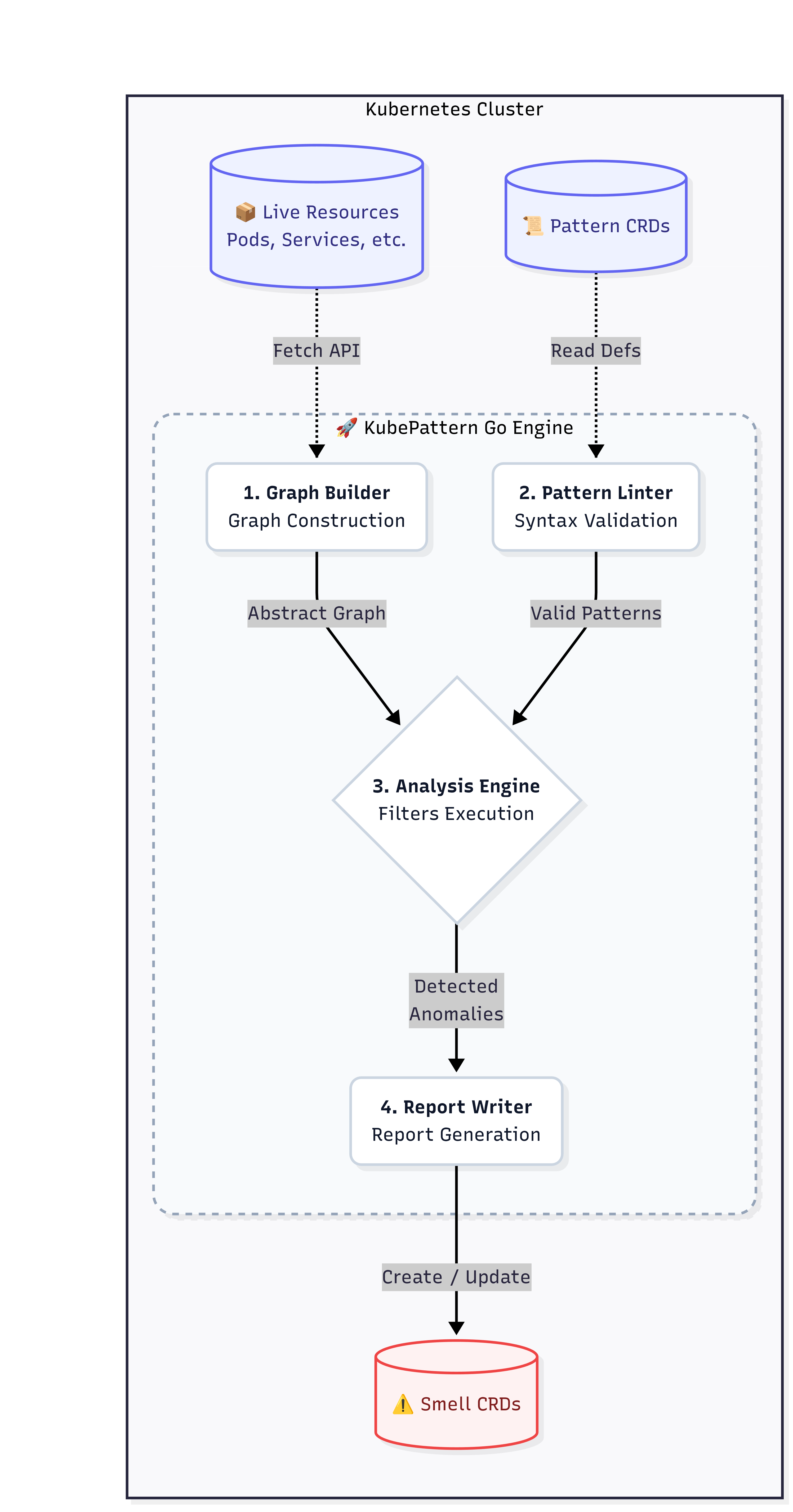
The Analysis Engine is the core component of KubePattern responsible for executing the logic defined in the Patterns and generating actionable insights (Smells) based on the state of the Kubernetes cluster.
For every Pattern loaded into the system, the engine executes a well-defined pipeline:
- Candidate Identification: The engine queries the cluster graph to find all potential "Targets" (the primary resources under examination) and "Dependencies" (the secondary resources the target should interact with), based on the resource
Kindand API version. - Applying Filters: The raw candidates are parsed to extract only the resources that meet specific conditions (the filters defined in the pattern). For example, if a pattern is only valid for Pods with certain labels, other Pods will be ignored.
- Relationship Evaluation: For each Target that survives the filtering stage, the engine evaluates the required relationships against the candidate Dependencies.
- Results Generation: If the relationships described by the Pattern are not satisfied for a given Target, it means an architectural violation has been detected. The engine then creates a report (a "Smell") and writes it to the cluster.
Fetching Data from the Cluster
To perform its analysis, the engine needs to retrieve data from the Kubernetes cluster. This is done through the Kubernetes API, using the client-go library. The engine fetches all relevant resources (e.g., Pods, Services, Deployments) and constructs an internal graph representation of the cluster's state. This graph allows the engine to efficiently navigate and query relationships between resources during the analysis process.
- Lazy Fetching: The engine implement lazy fetching strategies to optimize performance, only retrieving resources when necessary for the analysis.
- Caching: The engine caches retrieved resources during the analysis process, ensuring that repeated access to the same resource does not result in multiple API calls.
- Error Handling: The engine includes robust error handling mechanisms to manage API errors, timeouts, and other issues (e.g., rbac issues).
- Inheritance Fetching 🔥: The engine rebuilds the inheritance tree of resources, fetching all relevant parent and child resources as needed.
Workflow
Core Components of the Engine
To perform its job efficiently, the Analysis Engine is divided into three main logical components.
1. Filtering System
The filtering system is responsible for navigating deep within the configuration (manifests) of Kubernetes resources.
- Filter rules can be combined with logical operators to require that all conditions be true (
matchAll), that at least one is true (matchAny), or that none must occur (matchNone). - Advanced Navigation: Filters allow searching for values in any path of the YAML file (e.g.,
metadata.labels.app). They also support the use of wildcard expressions ([*]) to dynamically inspect lists and arrays (such as the containers in a Pod), automatically checking all elements. - Supported Operators: In addition to standard equality checks (
EQUALS), it is possible to verify the presence of empty or existing fields (EXISTS,IS_EMPTY), perform numeric comparisons (greater/less than), and even check the size of specific lists (e.g.,ARRAY_SIZE_EQUALS).
2. Relationship Resolver
After identifying Targets and Dependencies, KubePattern must verify how these resources communicate with each other. The Resolver interprets the relationships block of the Pattern.
- Similar to filters, relationships also rely on the
matchAll,matchAny, andmatchNoneconstructs. - A relationship is considered satisfied if the logic holds true for the Target against at least one of the resources that are part of the required dependencies.
- Relationship Types: KubePattern handles both "Custom Relationships"—where the user defines equality or intersection criteria by comparing a Target field with a Dependency field—and native Kubernetes concepts like ownership (
owns/ownedBy) or label selection (selects/selectedBy).
3. Generation and Output
The final output of the entire process is a native Kubernetes Custom Resource of type Smell.
- Dynamic Messages: When drafting the report for the user, the Engine can format the error message by replacing special placeholders with the actual data of the offending resource, providing clear, context-aware explanations.
- State and Idempotency: Each generated Smell has a deterministic and unique name (formed by combining the Pattern name with the Target's UID). This ensures that repeated analyses over time will update the existing Smell rather than duplicating it.
- Saved Details: The Smell contains essential metadata to facilitate resolution, including the category of the issue, its severity (e.g., LOW, CRITICAL), and the exact details of the target that caused the violation.